DSS API examples
This section provides example SOAP requests and responses for common operations supported by the Redtrust DSS API. Use these examples as a starting point when building or testing DSS requests, or when you want to understand how specific signing scenarios are expressed using the DSS protocol.
If you are new to the DSS API, start with the Getting started with the DSS API tutorial.
All examples in this guide share the following characteristics:
- They use SOAP 1.2.
- Authentication examples use WS-Security
UsernameToken. Some sections also include alternative authentication methods when relevant. - Requests are sent to the DSS API endpoint exposed by Redtrust.
- Each request includes a WS-Addressing
Actionheader that identifies the operation being invoked.
The SOAP envelope and header are included in full in each example so you can copy and paste the requests directly when testing.
How to use these examples
These examples are intentionally minimal and focus on the structure of the DSS requests and responses.
They assume that:
- You already have access to a Redtrust environment with the DSS service enabled
- You know which authentication method and endpoint to use
- You have a valid DSS signature profile configured in Redtrust
- You already know the thumbprint of the certificate you want to use
For a step-by-step walkthrough that includes environment setup and SoapUI configuration, see the Getting started with the DSS API tutorial.
Certificate discovery GetAccessibleCertificates
Use this example to retrieve the list of certificates available to the authenticated user. You can add a filter with values ecc or eidas.
- Username and Password
- JWT
   <soap:Envelope xmlns:soap="http://www.w3.org/2003/05/soap-envelope" xmlns:urn="urn:evolium:redtrust:dss:ws">
      <soap:Header xmlns:wsa="http://www.w3.org/2005/08/addressing">
         <wsse:Security xmlns:wsse="http://docs.oasis-open.org/wss/2004/01/oasis-200401-wss-wssecurity-secext-1.0.xsd" xmlns:wsu="http://docs.oasis-open.org/wss/2004/01/oasis-200401-wss-wssecurity-utility-1.0.xsd">
            <wsse:UsernameToken wsu:Id="0001">
               <wsse:Username>USERNAME</wsse:Username>
               <wsse:Password Type="http://docs.oasis-open.org/wss/2004/01/oasis-200401-wss-username-token-profile-1.0#PasswordText">PASSWORD</wsse:Password>
               <wsu:Created>2024-11-15T11:28:30.080Z</wsu:Created>
            </wsse:UsernameToken>
         </wsse:Security>
         <wsa:Action>urn:evolium:redtrust:dss:ws/RTDSSService/GetAccessibleCertificates</wsa:Action>
         <wsa:To>https://IP_REDTRUST:8080/RTDSSService.svc/basic</wsa:To>
      </soap:Header>
      <soap:Body>
         <urn:GetAccessibleCertificates/>
            <urn:filter></urn:filter>
      </soap:Body>
   </soap:Envelope>
    <soapenv:Envelope
        xmlns:soapenv="http://www.w3.org/2003/05/soap-envelope"
        xmlns:wsse="http://docs.oasis-open.org/wss/2004/01/oasis-200401-wss-wssecurity-secext-1.0.xsd"
        xmlns:wsu="http://docs.oasis-open.org/wss/2004/01/oasis-200401-wss-wssecurity-utility-1.0.xsd"
        xmlns:urn="urn:evolium:redtrust:dss:ws">

    <soapenv:Header>
        <wsa:Action xmlns:wsa="http://www.w3.org/2005/08/addressing">
            urn:evolium:redtrust:dss:ws/RTDSSService/GetAccessibleCertificates
        </wsa:Action>
        <wsa:To xmlns:wsa="http://www.w3.org/2005/08/addressing">
            https://REDTRUST_IP:8080/RTDSSService.svc/jwtoken
        </wsa:To>
        <wsse:Security >
        <wsse:BinarySecurityToken
            ValueType="urn:custom:jwt"
            EncodingType="urn:custom:jwt">YOUR_JWT</wsse:BinarySecurityToken>
        </wsse:Security>
    </soapenv:Header>

    <soapenv:Body>
        <urn:GetAccessibleCertificates/>
    </soapenv:Body>

    </soapenv:Envelope>
The example returns the certificates to which the username@domain user has permissions in the signing service. These certificates are those personal to the user and those to which they have access by policy.
Response
<s:Envelope xmlns:s="http://www.w3.org/2003/05/soap-envelope" xmlns:a="http://www.w3.org/2005/08/addressing">
   <s:Header>
      <a:Action s:mustUnderstand="1">urn:evolium:redtrust:dss:ws/RTDSSService/GetAccessibleCertificatesResponse</a:Action>
   </s:Header>
   <s:Body>
      <GetAccessibleCertificatesResponse xmlns="urn:evolium:redtrust:dss:ws">
         <Result xmlns:b="http://schemas.datacontract.org/2004/07/RTDSSService" xmlns:i="http://www.w3.org/2001/XMLSchema-instance">
            <b:ResultStatus>SUCCESS</b:ResultStatus>
            <b:ResultMessage>Operation finalized successfully</b:ResultMessage>
            <b:ResultData i:type="b:ArrayOfCertificate">
               <b:Certificate>
                  <b:X509Data>...</b:X509Data>
                  <b:alias>EIDAS CERTIFICADO PRUEBAS - 99999999R</b:alias>
                  <b:certificateHandler>6017</b:certificateHandler>
                  <b:expiration>2024-11-05T14:04:20</b:expiration>
                  <b:issuer>Ceres</b:issuer>
                  <b:needPin>false</b:needPin>
                  <b:needReason>false</b:needReason>
                  <b:subject>EIDAS CERTIFICADO PRUEBAS - 99999999R</b:subject>
                  <b:thumbprint>06F13CCD80E271D5355B3BEA322B8CBCE25B35F6</b:thumbprint>
                  <b:type>PRIVATE</b:type>
               </b:Certificate>
            </b:ResultData>
            <b:TotalItems>1</b:TotalItems>
         </Result>
      </GetAccessibleCertificatesResponse>
   </s:Body>
</s:Envelope>
Hash-based signing with SignHash
Use this example when you want to generate a signature (PKCS#1) from a precomputed hash. Both the id and the thumbprint of the chosen certificate can be specified to make the call.
The hash signature capability isn't enabled by default with the signature service license and must be requested to the support team.
Request
<soap:Envelope xmlns:soap="http://www.w3.org/2003/05/soap-envelope" xmlns:urn="urn:evolium:redtrust:dss:ws">
   <soap:Header xmlns:wsa="http://www.w3.org/2005/08/addressing">
        <wsse:Security xmlns:wsse="http://docs.oasis-open.org/wss/2004/01/oasis-200401-wss-wssecurity-secext-1.0.xsd" xmlns:wsu="http://docs.oasis-open.org/wss/2004/01/oasis-200401-wss-wssecurity-utility-1.0.xsd">
            <wsse:UsernameToken wsu:Id="UsernameToken-5F01A1638C9F9A33A1173167092288930">
                <wsse:Username>USERNAME</wsse:Username>
                <wsse:Password Type="http://docs.oasis-open.org/wss/2004/01/oasis-200401-wss-username-token-profile-1.0#PasswordText">PASSWORD</wsse:Password>
                <wsu:Created>2024-11-15T11:42:02.889Z</wsu:Created>
            </wsse:UsernameToken>
        </wsse:Security>
        <wsa:Action>urn:evolium:redtrust:dss:ws/RTDSSService/SignHash</wsa:Action>
        <wsa:To>https://IP_REDTRUST:8080/RTDSSService.svc/basic</wsa:To>
    </soap:Header>
   <soap:Body>
      <urn:SignHash>
         <!--Optional:-->
         <urn:toSignHashB64>ybWpO/j3yCfUhzWEWqdHcDgyQ8l5CWwea6Hj+GpI2CA=</urn:toSignHashB64>
         <!--Optional:-->
         <urn:thumbprint>THUMBPRINT</urn:thumbprint>
         <!--Optional:-->
         <!--<urn:certificatePin>?</urn:certificatePin>-->
         <!--Optional:-->
         <urn:algorithm>RSA_SHA256</urn:algorithm>
      </urn:SignHash>
   </soap:Body>
</soap:Envelope>
Response
<s:Envelope xmlns:s="http://www.w3.org/2003/05/soap-envelope" xmlns:a="http://www.w3.org/2005/08/addressing">
   <s:Header>
      <a:Action s:mustUnderstand="1">urn:evolium:redtrust:dss:ws/RTDSSService/SignHashResponse</a:Action>
   </s:Header>
   <s:Body>
      <SignHashResponse xmlns="urn:evolium:redtrust:dss:ws">
         <Result xmlns:b="http://schemas.datacontract.org/2004/07/RTDSSService" xmlns:i="http://www.w3.org/2001/XMLSchema-instance">
            <b:ResultStatus>SUCCESS</b:ResultStatus>
            <b:ResultMessage>Operation finalized successfully</b:ResultMessage>
            <b:ResultData i:type="c:string" xmlns:c="http://www.w3.org/2001/XMLSchema">JCtCs3wdvCl1Ql0tstzkMczNmNxcnaLNospXPB/miOi++fbG+jP6dTRvBwhJ4triE8TXxXMs5aVyCkl0oj+WumoO2zRGZSSk1mcbjrYuKP8m+gj5yp0bOGGPbvAIaphhqV87oU+2kcyCtNt32E0QQGRGW6kr+ADPctOFOD5loV84hRUqAw8AJQX20XjlKtzkhaDGBQFMGVUODAId/ywpxCYIQOetRXWcLfCNHQE/C4+jaNwamvPTGlVhn0Vr6xWAoN0/BKBk5eDVOynX7J2zl7TErkVrZ4WA2cIbxxuq2vj1MUMV89dDB54E4cc7UduYKzMIj0iEJ+19NL47NM96iQ==</b:ResultData>
         </Result>
      </SignHashResponse>
   </s:Body>
</s:Envelope>
DSS Signature with SignRequest
All document-based signatures in the DSS API are performed using the SignRequest operation.
While the examples in this section target different signature standards (XAdES, CAdES, PAdES), levels (BES, T, LTV, EPES), and modes (enveloped, enveloping, detached), they all share the same high-level request structure.
- SOAP header with WS-Security and WS-Addressing
SignRequest: Secifies a signature profileOptionalInputs: set of optional inputs (certificate selection, signature form, and optional features) that control how the signature is producedInputDocuments: input document to be signed.
The SignRequest element itself is also common across all signing scenarios. The differences between XAdES, CAdES, and PAdES signatures, as well as between levels (BES, T, LTV, EPES) and modes (enveloped, enveloping, detached), are expressed through:
- The
Profileattribute, which identifies the signature profile defined in Redtrust. - A
KeySelectorelement, used to select the signing certificate (typically by thumbprint). - One
Documentelement insideInputDocuments, containing the data to sign.
The following examples focus on these differences.
Expressing the signature mode
The signature mode defines how the signature relates to the signed document.
The mode can be fixed in the signature profile configuration or left open and provided in the SignRequest. If a mode is provided in the request, it must be compatible with the values defined in the signature profile.
The following snippets show how to express each mode in the request.
XML enveloping
<soap:Envelope xmlns:soap="http://www.w3.org/2003/05/soap-envelope"  xmlns:xd="http://www.w3.org/2000/09/xmldsig#">
 <soap:Header>
  …
 </soap:Header>
 <soap:Body>
  <SignRequest Profile="DSS_PROFILE" RequestID="" xmlns="urn:oasis:names:tc:dss:1.0:core:schema">
   <OptionalInputs>
   …
  <IncludeObject WhichDocument="ID-document-1" xmlns="urn:oasis:names:tc:dss:1.0:core:schema" />
   </OptionalInputs>
   <InputDocuments>
    <Document ID=”ID-document-1”>
    …
    </Document>
   </InputDocuments>
  </SignRequest>
 </soap:Body>
</soap:Envelope>
XML enveloped
<soap:Envelope xmlns:soap="http://www.w3.org/2003/05/soap-envelope"  xmlns:xd="http://www.w3.org/2000/09/xmldsig#">

 <soap:Header>
  …
 </soap:Header>
 <soap:Body>
  <SignRequest Profile="DSS_PROFILE" RequestID="PROFILE" xmlns="urn:oasis:names:tc:dss:1.0:core:schema">
   <OptionalInputs>
    …
    <SignaturePlacement WhichDocument="ID-document-1" xmlns="urn:oasis:names:tc:dss:1.0:core:schema" />
   </OptionalInputs>
   <InputDocuments>
    <Document ID="ID-document-1">
     <Base64Data MimeType="application/pdf">…</Base64Data>
    </Document>
   </InputDocuments>
  </SignRequest>
 </soap:Body>
</soap:Envelope>
XAdES
XAdES (XML Advanced Electronic Signature) is a set of extensions to XmlDSig that make it suitable for electronic signature, according to the European Union directive 1999/93/EC. One of the strengths of XAdES is that documents electronically signed using this system can remain valid for long periods of time.
XAdES BES
This examples describes how to make a call to the service to generate an XAdES signature at BES level and enveloped, enveloping or detached mode. The BES level is the most basic of the advanced signature, as described in the section Supported levels. Each mode is described in Supported modes.
Requirements
- There must be a signature profile in Redtrust defined for XAdES. The name must be XAdES, with the BES level selected (forced or not), enveloped mode selected (forced or not), the signing algorithm will depend on the certificate, typically RSA, and the digest algorithm SHA256.
- There must be a certificate with the request identifier.
- There must be a username@domain user.
- There must be a usage policy that allows the user to use the certificate for signing documents or use a personal certificate.
XAdES BES enveloped
Request
In this example:
SignatureFormis set to XAdES BES.SignaturePlacementspecifies enveloped mode and the document to sign.- The XML document is provided as
Base64XML.
<soap:Envelope xmlns:soap="http://www.w3.org/2003/05/soap-envelope" xmlns:urn="urn:oasis:names:tc:dss:1.0:core:schema" xmlns:xd="http://www.w3.org/2000/09/xmldsig#">
   <soap:Header xmlns:wsa="http://www.w3.org/2005/08/addressing">
      <wsse:Security xmlns:wsse="http://docs.oasis-open.org/wss/2004/01/oasis-200401-wss-wssecurity-secext-1.0.xsd" xmlns:wsu="http://docs.oasis-open.org/wss/2004/01/oasis-200401-wss-wssecurity-utility-1.0.xsd">
         <wsse:UsernameToken wsu:Id="0001">
            <wsse:Username>USERNAME</wsse:Username>
            <wsse:Password Type="http://docs.oasis-open.org/wss/2004/01/oasis-200401-wss-username-token-profile-1.0#PasswordText">PASSWORD</wsse:Password>
            <wsu:Created>2024-11-15T12:14:44.617Z</wsu:Created>
         </wsse:UsernameToken>
      </wsse:Security>
      <wsa:Action>urn:evolium:redtrust:dss:ws/RTDSSService/SignRequest</wsa:Action>
      <wsa:To>https://IP_REDTRUST:8080/RTDSSService.svc/basic</wsa:To>
   </soap:Header>
   <soap:Body>
      <SignRequest Profile="DSS_PROFILE" RequestID="XAdES-BES-Enveloped-RSA-SHA256" xmlns="urn:oasis:names:tc:dss:1.0:core:schema">
         <OptionalInputs>
            <dss:Language xmlns:dss="urn:oasis:names:tc:dss:1.0:core:schema">en-US</dss:Language>
            <KeySelector>
               <KeyInfo Id="Thumbprint" xmlns="http://www.w3.org/2000/09/xmldsig#">THUMBPRINT</KeyInfo>
            </KeySelector>
            <SignatureForm xmlns="urn:evolium:redtrust:dss:1.0:core:schema">urn:oasis:names:tc:dss:1.0:profiles:XAdES:forms:BES</SignatureForm>
            <SignaturePlacement WhichDocument="ID-document-1"/>
         </OptionalInputs>
         <InputDocuments>
            <Document ID="ID-document-1">
               <Base64XML>...</Base64XML>
            </Document>
         </InputDocuments>
      </SignRequest>
   </soap:Body>
</soap:Envelope>
Response
The response shows the overall status of the request in the ResultMajor tag, a SignaturePtr tag which is a reference to where the document is located within the response and finally the Base64XML tag which contains the document with the embedded signature encoded in Base64.
<s:Envelope xmlns:s="http://www.w3.org/2003/05/soap-envelope" xmlns:a="http://www.w3.org/2005/08/addressing">
   <s:Header>
      <a:Action s:mustUnderstand="1">urn:evolium:redtrust:dss:ws/RTDSSService/SignRequestResponse</a:Action>
   </s:Header>
   <s:Body xmlns:xsi="http://www.w3.org/2001/XMLSchema-instance" xmlns:xsd="http://www.w3.org/2001/XMLSchema">
      <SignResponse RequestID="XAdES-BES-Enveloped-RSA-SHA256" Profile="DSS_PROFILE" xmlns="urn:oasis:names:tc:dss:1.0:core:schema">
         <Result>
            <ResultMajor>urn:oasis:names:tc:dss:1.0:resultmajor:Success</ResultMajor>
         </Result>
         <OptionalOutputs>
            <dss:DocumentWithSignature xmlns:dss="urn:oasis:names:tc:dss:1.0:core:schema" xmlns:saml="urn:oasis:names:tc:SAML:1.0:assertion" xmlns:ds="http://www.w3.org/2000/09/xmldsig#" xmlns:rt="urn:evolium:redtrust:dss:1.0:core:schema" xmlns:xades="http://uri.etsi.org/01903/v1.3.2#">
               <dss:Document ID="ID-document-1">
                  <dss:Base64XML>...</dss:Base64XML>
               </dss:Document>
            </dss:DocumentWithSignature>
         </OptionalOutputs>
         <SignatureObject>
            <SignaturePtr WhichDocument="ID-document-1"/>
         </SignatureObject>
      </SignResponse>
   </s:Body>
</s:Envelope>
XAdES BES enveloping
In this example:
SignatureFormis set to XAdES BES.IncludeObjectspecifies enveloping mode and points to the document.- The XML document is provided as
InlineXML.
Request
<soap:Envelope xmlns:soap="http://www.w3.org/2003/05/soap-envelope" xmlns:urn="urn:oasis:names:tc:dss:1.0:core:schema" xmlns:xd="http://www.w3.org/2000/09/xmldsig#">
   <soap:Header xmlns:wsa="http://www.w3.org/2005/08/addressing">
      <wsse:Security xmlns:wsse="http://docs.oasis-open.org/wss/2004/01/oasis-200401-wss-wssecurity-secext-1.0.xsd" xmlns:wsu="http://docs.oasis-open.org/wss/2004/01/oasis-200401-wss-wssecurity-utility-1.0.xsd">
         <wsse:UsernameToken wsu:Id="0001">
            <wsse:Username>USERNAME</wsse:Username>
            <wsse:Password Type="http://docs.oasis-open.org/wss/2004/01/oasis-200401-wss-username-token-profile-1.0#PasswordText">PASSWORD</wsse:Password>
            <wsu:Created>2024-11-15T12:14:44.617Z</wsu:Created>
         </wsse:UsernameToken>
      </wsse:Security>
      <wsa:Action>urn:evolium:redtrust:dss:ws/RTDSSService/SignRequest</wsa:Action>
      <wsa:To>https://IP_REDTRUST:8080/RTDSSService.svc/basic</wsa:To>
   </soap:Header>
   <soap:Body>
      <SignRequest Profile="DSS_PROFILE" RequestID="XAdES enveloping" xmlns="urn:oasis:names:tc:dss:1.0:core:schema">
         <OptionalInputs>
            <dss:Language xmlns:dss="urn:oasis:names:tc:dss:1.0:core:schema">en-US</dss:Language>
            <KeySelector>
               <KeyInfo Id="Thumbprint" xmlns="http://www.w3.org/2000/09/xmldsig#">THUMBPRINT</KeyInfo>
            </KeySelector>
            <SignatureForm xmlns="urn:evolium:redtrust:dss:1.0:core:schema">urn:oasis:names:tc:dss:1.0:profiles:XAdES:forms:BES</SignatureForm>
            <IncludeObject WhichDocument="ID-document-1"/>
         </OptionalInputs>
         <InputDocuments>
            <Document ID="ID-document-1">
               <InlineXML>
                  <Document>
                     <Chapter>Text</Chapter>
                  </Document>
               </InlineXML>
            </Document>
         </InputDocuments>
      </SignRequest>
   </soap:Body>
</soap:Envelope>
The response shows the overall status of the request in the ResultMajor tag and a Base64Signature tag containing the signature with the embedded document encoded in Base64.
Response
<s:Envelope xmlns:s="http://www.w3.org/2003/05/soap-envelope" xmlns:a="http://www.w3.org/2005/08/addressing">
   <s:Header>
      <a:Action s:mustUnderstand="1">urn:evolium:redtrust:dss:ws/RTDSSService/SignRequestResponse</a:Action>
   </s:Header>
   <s:Body xmlns:xsi="http://www.w3.org/2001/XMLSchema-instance" xmlns:xsd="http://www.w3.org/2001/XMLSchema">
      <SignResponse RequestID="XAdES enveloping" Profile="DSS_PROFILE" xmlns="urn:oasis:names:tc:dss:1.0:core:schema">
         <Result>
            <ResultMajor>urn:oasis:names:tc:dss:1.0:resultmajor:Success</ResultMajor>
         </Result>
         <SignatureObject>
            <Base64Signature Type="urn:ietf:rfc:3275">...</Base64Signature>
         </SignatureObject>
      </SignResponse>
   </s:Body>
</s:Envelope>
XAdES BES detached
In this example:
SignatureFormis set to XAdES BES.- No mode element is included (
SignaturePlacement/IncludeObject), so the signature is detached (or the mode is forced by the profile). - The XML document is provided as
EscapedXML.
Request
<soap:Envelope xmlns:soap="http://www.w3.org/2003/05/soap-envelope" xmlns:urn="urn:oasis:names:tc:dss:1.0:core:schema" xmlns:xd="http://www.w3.org/2000/09/xmldsig#">
<soap:Header xmlns:wsa="http://www.w3.org/2005/08/addressing">
<wsse:Security xmlns:wsse="http://docs.oasis-open.org/wss/2004/01/oasis-200401-wss-wssecurity-secext-1.0.xsd" xmlns:wsu="http://docs.oasis-open.org/wss/2004/01/oasis-200401-wss-wssecurity-utility-1.0.xsd">
<wsse:UsernameToken wsu:Id="0001">
<wsse:Username>USERNAME</wsse:Username>
<wsse:Password Type="http://docs.oasis-open.org/wss/2004/01/oasis-200401-wss-username-token-profile-1.0#PasswordText">PASSWORD</wsse:Password>
<wsu:Created>2024-11-15T12:14:44.617Z</wsu:Created>
</wsse:UsernameToken>
</wsse:Security>
<wsa:Action>urn:evolium:redtrust:dss:ws/RTDSSService/SignRequest</wsa:Action>
<wsa:To>https://IP_REDTRUST:8080/RTDSSService.svc/basic</wsa:To>
</soap:Header>
<soap:Body>
<SignRequest Profile="DSS_PROFILE" RequestID="XAdES-BES-Detached" xmlns="urn:oasis:names:tc:dss:1.0:core:schema">
<OptionalInputs>
<dss:Language xmlns:dss="urn:oasis:names:tc:dss:1.0:core:schema">en-US</dss:Language>
<KeySelector>
<KeyInfo Id="Thumbprint" xmlns="http://www.w3.org/2000/09/xmldsig#">THUMBPRINT</KeyInfo>
</KeySelector>
<SignatureForm xmlns="urn:evolium:redtrust:dss:1.0:core:schema">urn:oasis:names:tc:dss:1.0:profiles:XAdES:forms:BES</SignatureForm>
</OptionalInputs>
<InputDocuments>
<Document ID="ID-document-1">
<EscapedXML><Document><Chapter>Text</Chapter></Document></EscapedXML>
</Document>
</InputDocuments>
</SignRequest>
</soap:Body>
</soap:Envelope>
The response shows the overall status of the request in the ResultMajor tag and a Base64Signature tag containing the Base64 encoded signature.
Response
<s:Envelope xmlns:s="http://www.w3.org/2003/05/soap-envelope" xmlns:a="http://www.w3.org/2005/08/addressing">
   <s:Header>
      <a:Action s:mustUnderstand="1">urn:evolium:redtrust:dss:ws/RTDSSService/SignRequestResponse</a:Action>
   </s:Header>
   <s:Body xmlns:xsi="http://www.w3.org/2001/XMLSchema-instance" xmlns:xsd="http://www.w3.org/2001/XMLSchema">
      <SignResponse RequestID="XAdES-BES-Detached" Profile="DSS_PROFILE" xmlns="urn:oasis:names:tc:dss:1.0:core:schema">
         <Result>
            <ResultMajor>urn:oasis:names:tc:dss:1.0:resultmajor:Success</ResultMajor>
         </Result>
         <SignatureObject>
            <Base64Signature Type="urn:ietf:rfc:3275">...</Base64Signature>
         </SignatureObject>
      </SignResponse>
   </s:Body>
</s:Envelope>
XAdES T enveloped
This example describes how to make a call to the service to generate an XAdES signature in T level and enveloped mode. The T level adds a timestamp to the signature, as described in the section Supported levels. The enveloped mode embeds the signature within the original document, as described in section Supported modes.
Requirements
- There must be a signature profile in Redtrust defined for XAdES. The name must be XAdES, with T level selected (forced or not), enveloped mode selected (forced or not), signing algorithm will depend on the certificate, typically RSA, and SHA256 digest algorithm, and at least one valid TSP selected as primary or secondary.
- There must be a certificate with the request identifier, PIN protected.
- There must be a username@domain user.
- There must be a usage policy that allows the user to use the certificate for signing documents or use a personal certificate.
In this request:
SignatureFormis set to XAdES T (ES-T).AdditionalKeyInfoprovides the certificate PIN.SignaturePlacementspecifies enveloped mode and the document to sign.- The XML document is provided as
Base64XML.
Request
<soap:Envelope xmlns:soap="http://www.w3.org/2003/05/soap-envelope" xmlns:urn="urn:oasis:names:tc:dss:1.0:core:schema" xmlns:xd="http://www.w3.org/2000/09/xmldsig#">
   <soap:Header xmlns:wsa="http://www.w3.org/2005/08/addressing">
      <wsse:Security xmlns:wsse="http://docs.oasis-open.org/wss/2004/01/oasis-200401-wss-wssecurity-secext-1.0.xsd" xmlns:wsu="http://docs.oasis-open.org/wss/2004/01/oasis-200401-wss-wssecurity-utility-1.0.xsd">
         <wsse:UsernameToken wsu:Id="0001">
            <wsse:Username>USERNAME</wsse:Username>
            <wsse:Password Type="http://docs.oasis-open.org/wss/2004/01/oasis-200401-wss-username-token-profile-1.0#PasswordText">PASSWORD</wsse:Password>
            <wsu:Created>2024-11-15T12:14:44.617Z</wsu:Created>
         </wsse:UsernameToken>
      </wsse:Security>
      <wsa:Action>urn:evolium:redtrust:dss:ws/RTDSSService/SignRequest</wsa:Action>
      <wsa:To>https://IP_REDTRUST:8080/RTDSSService.svc/basic</wsa:To>
   </soap:Header>
   <soap:Body>
      <SignRequest Profile="DSS_PROFILE" RequestID="XAdES-T-Forced-Enveloped-Forced-RSA-SHA256" xmlns="urn:oasis:names:tc:dss:1.0:core:schema">
         <OptionalInputs>
            <dss:Language xmlns:dss="urn:oasis:names:tc:dss:1.0:core:schema">en-US</dss:Language>
            <KeySelector>
               <KeyInfo Id="Thumbprint" xmlns="http://www.w3.org/2000/09/xmldsig#">THUMBPRINT</KeyInfo>
            </KeySelector>
            <AdditionalKeyInfo>
               <KeyInfo Id="Pin" xmlns="http://www.w3.org/2000/09/xmldsig#">CERTIFICATE_PIN</KeyInfo>
            </AdditionalKeyInfo>
            <SignatureForm xmlns="urn:evolium:redtrust:dss:1.0:core:schema">urn:oasis:names:tc:dss:1.0:profiles:XAdES:forms:ES-T</SignatureForm>
            <SignaturePlacement WhichDocument="ID-document-1"/>
         </OptionalInputs>
         <InputDocuments>
            <Document ID="ID-document-1">
               <Base64XML>...</Base64XML>
            </Document>
         </InputDocuments>
      </SignRequest>
   </soap:Body>
</soap:Envelope>
Response
The response shows the general status of the request in the ResultMajor tag, a SignaturePtr tag which is a reference to where the document is located within the response and finally the Base64XML tag which contains the document with the embedded signature encoded in Base64. The signature will contain a timestamp, which protects the signature against repudiation.
<s:Envelope xmlns:s="http://www.w3.org/2003/05/soap-envelope" xmlns:a="http://www.w3.org/2005/08/addressing">
   <s:Header>
      <a:Action s:mustUnderstand="1">urn:evolium:redtrust:dss:ws/RTDSSService/SignRequestResponse</a:Action>
   </s:Header>
   <s:Body xmlns:xsi="http://www.w3.org/2001/XMLSchema-instance" xmlns:xsd="http://www.w3.org/2001/XMLSchema">
      <SignResponse RequestID="XAdES-T-Forced-Enveloped-Forced-RSA-SHA256" Profile="DSS_PROFILE" xmlns="urn:oasis:names:tc:dss:1.0:core:schema">
         <Result>
            <ResultMajor>urn:oasis:names:tc:dss:1.0:resultmajor:Success</ResultMajor>
         </Result>
         <OptionalOutputs>
            <dss:DocumentWithSignature xmlns:dss="urn:oasis:names:tc:dss:1.0:core:schema" xmlns:saml="urn:oasis:names:tc:SAML:1.0:assertion" xmlns:ds="http://www.w3.org/2000/09/xmldsig#" xmlns:rt="urn:evolium:redtrust:dss:1.0:core:schema" xmlns:xades="http://uri.etsi.org/01903/v1.3.2#">
               <dss:Document ID="ID-document-1">
                  <dss:Base64XML>...</dss:Base64XML>
               </dss:Document>
            </dss:DocumentWithSignature>
         </OptionalOutputs>
         <SignatureObject>
            <SignaturePtr WhichDocument="ID-document-1"/>
         </SignatureObject>
      </SignResponse>
   </s:Body>
</s:Envelope>
XAdES EPES enveloped
This example describes how to make a call to the service to generate an XAdES signature at EPES level (with a signature policy), with enveloped mode. The EPES level is the same as the BES level only that a signature policy has been defined, as described in the section Supported levels. The enveloped mode embeds the signature within the original document, as described in section Supported modes.
FacturaE signatures use an XAdES EPES profile (signature policy). The baseline requirements are the same for all FacturaE versions; the only differences are the profile name, the policy (OID/URL + hash), and the XML schema your input must validate against.
Requirements
- A FacturaE signature profile must exist in Redtrust (XAdES + enveloped, with BES/EPES as appropriate for your setup). The name must be
FacturaE_3.0orFacturaE_3.1_3.2. - A signing certificate must exist and be accessible to the request context (the request identifier you use must map to an actual cert).
- A username@domain user must exist.
- A usage policy must allow that user to sign documents (or the cert must be the user’s personal certificate, depending on your model).
- The input document must be a valid FacturaE XML according to the facturae schema defined in the URL
http://www.facturae.gob.es/formato/Versiones%20anteriores/B)%20Versi%C3%B3n%203.0/Facturae30.xmlfor 3.0 orhttps://www.facturae.gob.es/formato/Versiones/Facturaev3_2.xmlfor 3.1. Redtrust does not validate your XML against the schema.
The policies you must include the following information:
FacturaE (3.0)
- Identifier:
http://www.facturae.gob.es/ signature policy facturae format/signature-policy facturae format v3_0.pdf - Hash algorithm:
sha1 - Hash:
HQvPemjDslVpcNmaJPpbHzhdZ50=
FacturaE (3.2)
- Identifier:
http://www.facturae.es/politica_de_firma_formato_facturae/politica_de_firma_formato_facturae_v3_1.pdf - Hash algorithm:
sha1 - Hash:
Ohixl6upD6av8N7pEvDABhEL6hM=
In this example:
Profileselects a FacturaE profile that includes the signature policy.- Mode and level are forced by the profile, so the request does not need additional mode/level elements.
- The XML document is provided as
Base64XML.
Request for 3.0
<soap:Envelope xmlns:soap="http://www.w3.org/2003/05/soap-envelope" xmlns:urn="urn:oasis:names:tc:dss:1.0:core:schema" xmlns:xd="http://www.w3.org/2000/09/xmldsig#">
   <soap:Header xmlns:wsa="http://www.w3.org/2005/08/addressing">
      <wsse:Security xmlns:wsse="http://docs.oasis-open.org/wss/2004/01/oasis-200401-wss-wssecurity-secext-1.0.xsd" xmlns:wsu="http://docs.oasis-open.org/wss/2004/01/oasis-200401-wss-wssecurity-utility-1.0.xsd">
         <wsse:UsernameToken wsu:Id="0001">
            <wsse:Username>USERNAME</wsse:Username>
            <wsse:Password Type="http://docs.oasis-open.org/wss/2004/01/oasis-200401-wss-username-token-profile-1.0#PasswordText">PASSWORD</wsse:Password>
            <wsu:Created>2024-11-15T12:14:44.617Z</wsu:Created>
         </wsse:UsernameToken>
      </wsse:Security>
      <wsa:Action>urn:evolium:redtrust:dss:ws/RTDSSService/SignRequest</wsa:Action>
      <wsa:To>https://IP_REDTRUST:8080/RTDSSService.svc/basic</wsa:To>
   </soap:Header>
   <soap:Body>
      <SignRequest Profile="DSS_PROFILE" RequestID="XAdES-Facturae_3.0-EPES_Forced-Enveloped-RSA-SHA256" xmlns="urn:oasis:names:tc:dss:1.0:core:schema">
         <OptionalInputs>
            <dss:Language xmlns:dss="urn:oasis:names:tc:dss:1.0:core:schema">en-US</dss:Language>
            <KeySelector>
               <KeyInfo Id="Thumbprint" xmlns="http://www.w3.org/2000/09/xmldsig#">THUMBPRINT</KeyInfo>
            </KeySelector>
            <SignatureForm xmlns="urn:evolium:redtrust:dss:1.0:core:schema">urn:oasis:names:tc:dss:1.0:profiles:XAdES:forms:EPES</SignatureForm>
         </OptionalInputs>
         <InputDocuments>
            <Document ID="ID-document-1">
               <Base64XML>...</Base64XML>
            </Document>
         </InputDocuments>
      </SignRequest>
   </soap:Body>
</soap:Envelope>
Request for 3.1/3.2
<soap:Envelope xmlns:soap="http://www.w3.org/2003/05/soap-envelope" xmlns:urn="urn:oasis:names:tc:dss:1.0:core:schema" xmlns:xd="http://www.w3.org/2000/09/xmldsig#">
   <soap:Header xmlns:wsa="http://www.w3.org/2005/08/addressing">
      <wsse:Security xmlns:wsse="http://docs.oasis-open.org/wss/2004/01/oasis-200401-wss-wssecurity-secext-1.0.xsd" xmlns:wsu="http://docs.oasis-open.org/wss/2004/01/oasis-200401-wss-wssecurity-utility-1.0.xsd">
         <wsse:UsernameToken wsu:Id="0001">
            <wsse:Username>USERNAME</wsse:Username>
            <wsse:Password Type="http://docs.oasis-open.org/wss/2004/01/oasis-200401-wss-username-token-profile-1.0#PasswordText">PASSWORD</wsse:Password>
            <wsu:Created>2024-11-15T12:14:44.617Z</wsu:Created>
         </wsse:UsernameToken>
      </wsse:Security>
      <wsa:Action>urn:evolium:redtrust:dss:ws/RTDSSService/SignRequest</wsa:Action>
      <wsa:To>https://IP_REDTRUST:8080/RTDSSService.svc/basic</wsa:To>
   </soap:Header>
   <soap:Body>
      <SignRequest Profile="DSS_PROFILE" RequestID="XAdES-Facturae_3.1_3.2-EPES-Forced-Enveloped-Forced-RSA-SHA2" xmlns="urn:oasis:names:tc:dss:1.0:core:schema">
         <OptionalInputs>
            <dss:Language xmlns:dss="urn:oasis:names:tc:dss:1.0:core:schema">en-US</dss:Language>
            <KeySelector>
               <KeyInfo Id="Thumbprint" xmlns="http://www.w3.org/2000/09/xmldsig#">THUMBPRINT</KeyInfo>
            </KeySelector>
            <SignaturePlacement WhichDocument="ID-document-1"/>
         </OptionalInputs>
         <InputDocuments>
            <Document ID="ID-document-1">
               <Base64XML>...</Base64XML>
            </Document>
         </InputDocuments>
      </SignRequest>
   </soap:Body>
</soap:Envelope>
The response shows the general status of the request in the ResultMajor tag, a SignaturePtr tag which is a reference to where the document is located within the response and finally the Base64XML tag which contains the document with the embedded signature encoded in Base64. By including the signature policy in the profile, the signature will contain that information and will be valid as an e-invoice 3.0, provided that the input document is valid according to the schema. Redtrust doesn't validate the XML format, it's your responsibility to validate the format, if necessary, before sending the request to the service.
Response for 3.0
<s:Envelope xmlns:s="http://www.w3.org/2003/05/soap-envelope" xmlns:a="http://www.w3.org/2005/08/addressing">
   <s:Header>
      <a:Action s:mustUnderstand="1">urn:evolium:redtrust:dss:ws/RTDSSService/SignRequestResponse</a:Action>
   </s:Header>
   <s:Body xmlns:xsi="http://www.w3.org/2001/XMLSchema-instance" xmlns:xsd="http://www.w3.org/2001/XMLSchema">
      <SignResponse RequestID="XAdES-Facturae_3.0-EPES_Forced-Enveloped-RSA-SHA256" Profile="DSS_PROFILE" xmlns="urn:oasis:names:tc:dss:1.0:core:schema">
         <Result>
            <ResultMajor>urn:oasis:names:tc:dss:1.0:resultmajor:Success</ResultMajor>
         </Result>
         <SignatureObject>
            <Base64Signature Type="urn:ietf:rfc:3275">...</Base64Signature>
         </SignatureObject>
      </SignResponse>
   </s:Body>
</s:Envelope>
Response for 3.1/3.2
The response shows the general status of the request in the ResultMajor tag, a SignaturePtr tag which is a reference to where the document is located within the response and finally the Base64XML tag which contains the document with the embedded signature encoded in Base64. By including the signature policy in the profile, the signature will contain that information and will be valid as an electronic invoice 3.2, as long as the input document is valid according to the schema. Redtrust doesn't validate XML formatting, it's your responsibility to validate the formatting before submitting the request to the service.
<s:Envelope xmlns:s="http://www.w3.org/2003/05/soap-envelope" xmlns:a="http://www.w3.org/2005/08/addressing">
   <s:Header>
      <a:Action s:mustUnderstand="1">urn:evolium:redtrust:dss:ws/RTDSSService/SignRequestResponse</a:Action>
   </s:Header>
   <s:Body xmlns:xsi="http://www.w3.org/2001/XMLSchema-instance" xmlns:xsd="http://www.w3.org/2001/XMLSchema">
      <SignResponse RequestID="XAdES-Facturae_3.1_3.2-EPES-Forced-Enveloped-Forced-RSA-SHA2" Profile="DSS_PROFILE" xmlns="urn:oasis:names:tc:dss:1.0:core:schema">
         <Result>
            <ResultMajor>urn:oasis:names:tc:dss:1.0:resultmajor:Success</ResultMajor>
         </Result>
         <OptionalOutputs>
            <dss:DocumentWithSignature xmlns:dss="urn:oasis:names:tc:dss:1.0:core:schema" xmlns:saml="urn:oasis:names:tc:SAML:1.0:assertion" xmlns:ds="http://www.w3.org/2000/09/xmldsig#" xmlns:rt="urn:evolium:redtrust:dss:1.0:core:schema" xmlns:xades="http://uri.etsi.org/01903/v1.3.2#">
               <dss:Document ID="ID-document-1">
                  <dss:Base64XML>...</dss:Base64XML>
               </dss:Document>
            </dss:DocumentWithSignature>
         </OptionalOutputs>
         <SignatureObject>
            <SignaturePtr WhichDocument="ID-document-1"/>
         </SignatureObject>
      </SignResponse>
   </s:Body>
</s:Envelope>
CAdES (CMS Advanced Electronic Signature)
CAdES (CMS Advanced Electronic Signature) is a set of CMS extensions that make it suitable for electronic signature, according to the European Union directive 1999/93/EC. Like XAdES, one of the strengths of CAdES is that documents electronically signed using CAdES can remain valid for long periods of time.
Below are a few examples of using Redtrust's DSS API to sign documents using CAdES.
CAdES BES enveloping
This example describes how to make a call to the service to generate a CAdES signature in BES level and enveloping mode. The BES level is the most basic of the advanced signature, as described in section Supported levels. The enveloping mode embeds the original document within the signature, as described in the section Supported modes.
Requirements.
- There must be a signature profile in Redtrust defined for CAdES. The name must be CAdES, with the BES level selected (forced or not), enveloping mode selected (forced or not), signing algorithm will depend on the certificate, typically RSA, and digest algorithm SHA256.
- There must be a certificate with the request identifier.
- There must be a username@domain user.
- There must be a usage policy that allows the user to use the certificate for signing documents or to use the user's personal certificate.
The request shows the KeyInfo with the certificate thumbprint to sign with, the SignatureForm tag that specifies that the level will be BES, the IncludeEContent tag specifies that the mode has to be enveloping and the XML document to sign encoded in Base64 inside the Base64Data tag.
In this example:
SignatureFormis set to BES.IncludeEContentrequests an enveloping signature (embed the content).- The input document is provided as
Base64Data.
Request
<soap:Envelope xmlns:soap="http://www.w3.org/2003/05/soap-envelope" xmlns:urn="urn:oasis:names:tc:dss:1.0:core:schema" xmlns:xd="http://www.w3.org/2000/09/xmldsig#">
   <soap:Header xmlns:wsa="http://www.w3.org/2005/08/addressing">
      <wsse:Security xmlns:wsse="http://docs.oasis-open.org/wss/2004/01/oasis-200401-wss-wssecurity-secext-1.0.xsd" xmlns:wsu="http://docs.oasis-open.org/wss/2004/01/oasis-200401-wss-wssecurity-utility-1.0.xsd">
         <wsse:UsernameToken wsu:Id="0001">
            <wsse:Username>USERNAME</wsse:Username>
            <wsse:Password Type="http://docs.oasis-open.org/wss/2004/01/oasis-200401-wss-username-token-profile-1.0#PasswordText">PASSWORD</wsse:Password>
            <wsu:Created>2024-11-15T12:14:44.617Z</wsu:Created>
         </wsse:UsernameToken>
      </wsse:Security>
      <wsa:Action>urn:evolium:redtrust:dss:ws/RTDSSService/SignRequest</wsa:Action>
      <wsa:To>https://IP_REDTRUST:8080/RTDSSService.svc/basic</wsa:To>
   </soap:Header>
   <soap:Body>
      <SignRequest Profile="DSS_PROFILE" RequestID="CAdES-BES-Enveloping" xmlns="urn:oasis:names:tc:dss:1.0:core:schema">
         <OptionalInputs>
            <dss:Language xmlns:dss="urn:oasis:names:tc:dss:1.0:core:schema">en-US</dss:Language>
            <KeySelector>
               <KeyInfo Id="Thumbprint" xmlns="http://www.w3.org/2000/09/xmldsig#">THUMBPRINT</KeyInfo>
            </KeySelector>
            <IncludeEContent/>
            <SignatureForm xmlns="urn:evolium:redtrust:dss:1.0:core:schema">urn:oasis:names:tc:dss:1.0:profiles:XAdES:forms:BES</SignatureForm>
         </OptionalInputs>
         <InputDocuments>
            <Document ID="ID-document-1">
               <Base64Data MimeType="text/plain">RmljaGVybyBkZSBwcnVlYmEgYSBmaXJtYXI=</Base64Data>
            </Document>
         </InputDocuments>
      </SignRequest>
   </soap:Body>
</soap:Envelope>
The response shows the overall status of the request in the ResultMajor tag, a Base64Signature tag containing the signature with the embedded document encoded in Base64.
Response
<s:Envelope xmlns:s="http://www.w3.org/2003/05/soap-envelope" xmlns:a="http://www.w3.org/2005/08/addressing">
   <s:Header>
      <a:Action s:mustUnderstand="1">urn:evolium:redtrust:dss:ws/RTDSSService/SignRequestResponse</a:Action>
   </s:Header>
   <s:Body xmlns:xsi="http://www.w3.org/2001/XMLSchema-instance" xmlns:xsd="http://www.w3.org/2001/XMLSchema">
      <SignResponse RequestID="CAdES-BES-Enveloping" Profile="DSS_PROFILE" xmlns="urn:oasis:names:tc:dss:1.0:core:schema">
         <Result>
            <ResultMajor>urn:oasis:names:tc:dss:1.0:resultmajor:Success</ResultMajor>
         </Result>
         <SignatureObject>
            <Base64Signature Type="urn:ietf:rfc:3369">...</Base64Signature>
         </SignatureObject>
      </SignResponse>
   </s:Body>
</s:Envelope>
CAdES BES detached
This example describes how to make a call to the service to generate a CAdES signature in BES level and detached mode. The BES level is the most basic of the advanced signature, as described in the section Supported levels. The detached mode generates a signature separate from the document, as described in the section Supported modes.
Requirements
- There must be a signature profile in Redtrust defined for CAdES. The name must be CAdES, with BES level selected (forced or not), detached mode selected (forced or not), signing algorithm will depend on the certificate, typically RSA, and digest algorithm SHA256.
- There must be a certificate with the request identifier.
- There must be a username@domain user.
- There must be a usage policy that allows the user to use the certificate for signing documents or to use the user's personal certificate.
In this example:
SignatureFormis set to BES.IncludeEContentis omitted, so the signature is detached (or the mode is forced by the profile).- The input document is provided as
Base64Data.
Request
<soap:Envelope xmlns:soap="http://www.w3.org/2003/05/soap-envelope" xmlns:urn="urn:oasis:names:tc:dss:1.0:core:schema" xmlns:xd="http://www.w3.org/2000/09/xmldsig#">
   <soap:Header xmlns:wsa="http://www.w3.org/2005/08/addressing">
      <wsse:Security xmlns:wsse="http://docs.oasis-open.org/wss/2004/01/oasis-200401-wss-wssecurity-secext-1.0.xsd" xmlns:wsu="http://docs.oasis-open.org/wss/2004/01/oasis-200401-wss-wssecurity-utility-1.0.xsd">
         <wsse:UsernameToken wsu:Id="0001">
            <wsse:Username>USERNAME</wsse:Username>
            <wsse:Password Type="http://docs.oasis-open.org/wss/2004/01/oasis-200401-wss-username-token-profile-1.0#PasswordText">PASSWORD</wsse:Password>
            <wsu:Created>2024-11-15T12:14:44.617Z</wsu:Created>
         </wsse:UsernameToken>
      </wsse:Security>
      <wsa:Action>urn:evolium:redtrust:dss:ws/RTDSSService/SignRequest</wsa:Action>
      <wsa:To>https://IP_REDTRUST:8080/RTDSSService.svc/basic</wsa:To>
   </soap:Header>
   <soap:Body>
      <SignRequest Profile="DSS_PROFILE" RequestID="CAdES-BES-Detached" xmlns="urn:oasis:names:tc:dss:1.0:core:schema">
         <OptionalInputs>
            <dss:Language xmlns:dss="urn:oasis:names:tc:dss:1.0:core:schema">en-US</dss:Language>
            <KeySelector>
               <KeyInfo Id="Thumbprint" xmlns="http://www.w3.org/2000/09/xmldsig#">THUMBPRINT</KeyInfo>
            </KeySelector>
            <SignatureForm xmlns="urn:evolium:redtrust:dss:1.0:core:schema">urn:oasis:names:tc:dss:1.0:profiles:XAdES:forms:BES</SignatureForm>
         </OptionalInputs>
         <InputDocuments>
            <Document ID="ID-document-1">
               <Base64Data MimeType="text/plain">RmljaGVybyBkZSBwcnVlYmEgYSBmaXJtYXI=</Base64Data>
            </Document>
         </InputDocuments>
      </SignRequest>
   </soap:Body>
</soap:Envelope>
The request shows the KeyInfo with the certificate thumbprint to sign with, the SignatureForm tag that specifies that the level will be BES and the XML document to sign encoded in Base64 inside the Base64Data tag. The absence of the IncludeEContent tag specifies that the forced mode is used in the profile or if the detached mode isn't forced.
Response
<s:Envelope xmlns:s="http://www.w3.org/2003/05/soap-envelope" xmlns:a="http://www.w3.org/2005/08/addressing">
   <s:Header>
      <a:Action s:mustUnderstand="1">urn:evolium:redtrust:dss:ws/RTDSSService/SignRequestResponse</a:Action>
   </s:Header>
   <s:Body xmlns:xsi="http://www.w3.org/2001/XMLSchema-instance" xmlns:xsd="http://www.w3.org/2001/XMLSchema">
      <SignResponse RequestID="CAdES-BES-Detached" Profile="DSS_PROFILE" xmlns="urn:oasis:names:tc:dss:1.0:core:schema">
         <Result>
            <ResultMajor>urn:oasis:names:tc:dss:1.0:resultmajor:Success</ResultMajor>
         </Result>
         <SignatureObject>
            <Base64Signature Type="urn:ietf:rfc:3369">...</Base64Signature>
         </SignatureObject>
      </SignResponse>
   </s:Body>
</s:Envelope>
The response shows the overall status of the request in the ResultMajor tag, a Base64Signature tag containing the Base64 encoded signature.
PAdES
PAdES (PDF Advanced Electronic Signature) is a set of extensions to PDF and ISO 32000-1 that make it suitable for electronic signature, according to the European Union directive 1999/93/EC.
A few examples of using Redtrust's DSS API to sign documents using PAdES will be shown below.
BES PDF
This example describes how to make a call to the service to generate a PAdES signature at the BES level. The BES level is the most basic of the advanced signature, as described in the section Supported levels. PAdES only supports enveloped mode as described in section Supported modes.
Requirements
- There must be a signature profile in Redtrust defined for PAdES. The name must be PAdES, with the BES level selected (forced or not), enveloped mode. The signature algorithm will depend on the certificate, normally RSA, and digest algorithm SHA256.
- There must be a certificate with the request identifier.
- There must be a username@domain user.
- There must be a usage policy that allows the user to use the certificate for signing documents or to use the user's personal certificate.
In this example:
SignatureFormis set to BES.- The input document is a PDF provided as
Base64DatawithMimeType="application/pdf".
Request
<soap:Envelope xmlns:soap="http://www.w3.org/2003/05/soap-envelope" xmlns:urn="urn:oasis:names:tc:dss:1.0:core:schema" xmlns:xd="http://www.w3.org/2000/09/xmldsig#">
   <soap:Header xmlns:wsa="http://www.w3.org/2005/08/addressing">
      <wsse:Security xmlns:wsse="http://docs.oasis-open.org/wss/2004/01/oasis-200401-wss-wssecurity-secext-1.0.xsd" xmlns:wsu="http://docs.oasis-open.org/wss/2004/01/oasis-200401-wss-wssecurity-utility-1.0.xsd">
         <wsse:UsernameToken wsu:Id="0001">
            <wsse:Username>USERNAME</wsse:Username>
            <wsse:Password Type="http://docs.oasis-open.org/wss/2004/01/oasis-200401-wss-username-token-profile-1.0#PasswordText">PASSWORD</wsse:Password>
            <wsu:Created>2024-11-15T12:14:44.617Z</wsu:Created>
         </wsse:UsernameToken>
      </wsse:Security>
      <wsa:Action>urn:evolium:redtrust:dss:ws/RTDSSService/SignRequest</wsa:Action>
      <wsa:To>https://REDTRUST_IP:8080/RTDSSService.svc/basic</wsa:To>
   </soap:Header>
   <soap:Body>
      <SignRequest Profile="DSS_PROFILE" RequestID="PAdES_BES" xmlns="urn:oasis:names:tc:dss:1.0:core:schema">
         <OptionalInputs>
            <Language>en-US</Language>
            <KeySelector>
               <KeyInfo Id="Thumbprint" xmlns="http://www.w3.org/2000/09/xmldsig#">THUMBPRINT</KeyInfo>
            </KeySelector>
            <SignatureForm xmlns="urn:evolium:redtrust:dss:1.0:core:schema">urn:oasis:names:tc:dss:1.0:profiles:XAdES:forms:BES</SignatureForm>
         </OptionalInputs>
         <InputDocuments>
            <Document ID="ID-document-1">
               <Base64Data MimeType="application/pdf">...</Base64Data>
            </Document>
         </InputDocuments>
      </SignRequest>
   </soap:Body>
</soap:Envelope>
The response shows the overall status of the request in the ResultMajor tag, a Base64Signature tag containing the PDF file with the signature encoded in Base64.
Response
<s:Envelope xmlns:s="http://www.w3.org/2003/05/soap-envelope" xmlns:a="http://www.w3.org/2005/08/addressing">
   <s:Header>
      <a:Action s:mustUnderstand="1">urn:evolium:redtrust:dss:ws/RTDSSService/SignRequestResponse</a:Action>
   </s:Header>
   <s:Body xmlns:xsi="http://www.w3.org/2001/XMLSchema-instance" xmlns:xsd="http://www.w3.org/2001/XMLSchema">
      <SignResponse RequestID="PAdES_BES" Profile="DSS_PROFILE" xmlns="urn:oasis:names:tc:dss:1.0:core:schema">
         <Result>
            <ResultMajor>urn:oasis:names:tc:dss:1.0:resultmajor:Success</ResultMajor>
         </Result>
         <SignatureObject>
            <Base64Signature Type="urn:ietf:rfc:3369">...</Base64Signature>
         </SignatureObject>
      </SignResponse>
   </s:Body>
</s:Envelope>
Visible BES PDF
This example describes how to make a call to the service to generate a PAdES signature at BES level and with visual representation of the signature. The BES level is the most basic of the advanced signature, as described in the section Supported levels. PAdES only supports enveloped mode as described in section Supported modes.
Requirements
- There must be a signature profile in Redtrust defined for PAdES. The name must be PAdES, with the BES level selected (forced or not), enveloped mode, signature algorithm will depend on the certificate, typically RSA, and digest algorithm SHA256.
- There must be a certificate with the request identifier.
- There must be a username@domain user.
- There must be a usage policy that allows the user to use the certificate for signing documents or to use the user's personal certificate.
In this example:
VisibleSignatureConfigurationdefines the visible signature (position and displayed items).SignatureFormis set to BES.- The input document is a PDF provided as
Base64DatawithMimeType="application/pdf".
Request
<soap:Envelope xmlns:soap="http://www.w3.org/2003/05/soap-envelope" xmlns:urn="urn:oasis:names:tc:dss:1.0:core:schema" xmlns:xd="http://www.w3.org/2000/09/xmldsig#">
   <soap:Header xmlns:wsa="http://www.w3.org/2005/08/addressing">
      <wsse:Security xmlns:wsse="http://docs.oasis-open.org/wss/2004/01/oasis-200401-wss-wssecurity-secext-1.0.xsd" xmlns:wsu="http://docs.oasis-open.org/wss/2004/01/oasis-200401-wss-wssecurity-utility-1.0.xsd">
         <wsse:UsernameToken wsu:Id="0001">
            <wsse:Username>USERNAME</wsse:Username>
            <wsse:Password Type="http://docs.oasis-open.org/wss/2004/01/oasis-200401-wss-username-token-profile-1.0#PasswordText">PASSWORD</wsse:Password>
            <wsu:Created>2024-11-15T12:14:44.617Z</wsu:Created>
         </wsse:UsernameToken>
      </wsse:Security>
      <wsa:Action>urn:evolium:redtrust:dss:ws/RTDSSService/SignRequest</wsa:Action>
      <wsa:To>https://IP_REDTRUST:8080/RTDSSService.svc/basic</wsa:To>
   </soap:Header>
   <soap:Body>
      <SignRequest Profile="DSS_PROFILE" RequestID="PAdES_BES" xmlns="urn:oasis:names:tc:dss:1.0:core:schema">
         <OptionalInputs>
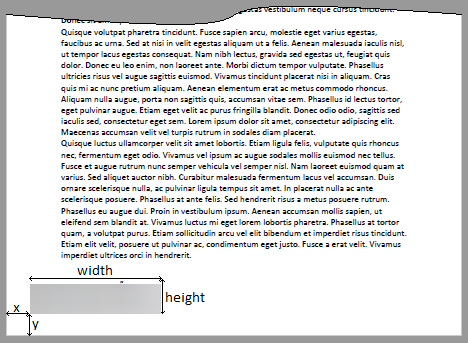
            <q1:VisibleSignatureConfiguration xmlns:q1="urn:oasis:names:tc:dssx:1.0:profiles:VisibleSignatures:schema#">
               <q1:VisibleSignaturePolicy>GeneralPolicy</q1:VisibleSignaturePolicy>
               <q1:VisibleSignaturePosition d4p1:type="q1:PixelVisibleSignaturePositionType" xmlns:d4p1="http://www.w3.org/2001/XMLSchema-instance">
                  <q1:PageNumber>1</q1:PageNumber>
                  <q1:x>30</q1:x>
                  <q1:y>30</q1:y>
                  <q1:Width>200</q1:Width>
                  <q1:Height>60</q1:Height>
               </q1:VisibleSignaturePosition>
               <q1:VisibleSignatureItemsConfiguration>
                  <q1:VisibleSignatureItem>
                     <q1:ItemName>CustomText</q1:ItemName>
                  </q1:VisibleSignatureItem>
                  <q1:VisibleSignatureItem>
                     <q1:ItemName>SignatureReason</q1:ItemName>
                     <q1:ItemValue d4p1:type="q1:ItemValueStringType" xmlns:d4p1="http://www.w3.org/2001/XMLSchema-instance">
                        <q1:ItemValue>Razón de firma</q1:ItemValue>
                     </q1:ItemValue>
                  </q1:VisibleSignatureItem>
                  <q1:VisibleSignatureItem>
                     <q1:ItemName>SignatureProductionPlace</q1:ItemName>
                     <q1:ItemValue d4p1:type="q1:ItemValueStringType" xmlns:d4p1="http://www.w3.org/2001/XMLSchema-instance">
                        <q1:ItemValue>Barcelona</q1:ItemValue>
                     </q1:ItemValue>
                  </q1:VisibleSignatureItem>
                  <q1:VisibleSignatureItem>
                     <q1:ItemName>SignerContactInfo</q1:ItemName>
                     <q1:ItemValue d4p1:type="q1:ItemValueStringType" xmlns:d4p1="http://www.w3.org/2001/XMLSchema-instance">
                        <q1:ItemValue>Usuario de Redtrust (usuario.Redtrust@evolium.com)</q1:ItemValue>
                     </q1:ItemValue>
                  </q1:VisibleSignatureItem>
               </q1:VisibleSignatureItemsConfiguration>
            </q1:VisibleSignatureConfiguration>
            <Language>en-US</Language>
            <KeySelector>
               <KeyInfo Id="Thumbprint" xmlns="http://www.w3.org/2000/09/xmldsig#">THUMBPRINT</KeyInfo>
            </KeySelector>
            <SignatureForm xmlns="urn:evolium:redtrust:dss:1.0:core:schema">urn:oasis:names:tc:dss:1.0:profiles:XAdES:forms:BES</SignatureForm>
         </OptionalInputs>
         <InputDocuments>
            <Document ID="ID-document-1">
               <Base64Data MimeType="application/pdf">...</Base64Data>
            </Document>
         </InputDocuments>
      </SignRequest>
   </soap:Body>
</soap:Envelope>
The visual representation part of the signature is located inside the VisibleSignatureConfiguration. The signature would look as shown in the following representation:
The response shows the overall status of the request in the ResultMajor tag, a Base64Signature tag containing the PDF file with the signature encoded in Base64.
Response
<s:Envelope xmlns:s="http://www.w3.org/2003/05/soap-envelope" xmlns:a="http://www.w3.org/2005/08/addressing">
   <s:Header>
      <a:Action s:mustUnderstand="1">urn:evolium:redtrust:dss:ws/RTDSSService/SignRequestResponse</a:Action>
   </s:Header>
   <s:Body xmlns:xsi="http://www.w3.org/2001/XMLSchema-instance" xmlns:xsd="http://www.w3.org/2001/XMLSchema">
      <SignResponse RequestID="PAdES_BES" Profile="DSS_PROFILE" xmlns="urn:oasis:names:tc:dss:1.0:core:schema">
         <Result>
            <ResultMajor>urn:oasis:names:tc:dss:1.0:resultmajor:Success</ResultMajor>
         </Result>
         <SignatureObject>
            <Base64Signature Type="urn:ietf:rfc:3369">...</Base64Signature>
         </SignatureObject>
      </SignResponse>
   </s:Body>
</s:Envelope>
Visible PDF BES with signature image
This example describes how to make a call to the service to generate a PAdES signature at BES level and with visual representation of the signature with image. The BES level is the most basic of the advanced signature, as described in the section Supported levels. PAdES only supports enveloped mode as described in section Supported modes.
Requirements
- There must be a signature profile in Redtrust defined for PAdES. The name must be PAdES, with the BES level selected (forced or not), enveloped mode, signature algorithm will depend on the certificate, typically RSA, and digest algorithm SHA256.
- There must be a certificate with the request identifier.
- There must be a username@domain user.
- There must be a usage policy that allows the user to use the certificate for signing documents or to use the user's personal certificate.
In this example:
VisibleSignatureConfigurationdefines the visible signature and includesSignerImage.SignatureFormis set to BES.- The input document is a PDF provided as
Base64DatawithMimeType="application/pdf".
Request
<soap:Envelope xmlns:soap="http://www.w3.org/2003/05/soap-envelope" xmlns:urn="urn:oasis:names:tc:dss:1.0:core:schema" xmlns:xd="http://www.w3.org/2000/09/xmldsig#">
   <soap:Header xmlns:wsa="http://www.w3.org/2005/08/addressing">
      <wsse:Security xmlns:wsse="http://docs.oasis-open.org/wss/2004/01/oasis-200401-wss-wssecurity-secext-1.0.xsd" xmlns:wsu="http://docs.oasis-open.org/wss/2004/01/oasis-200401-wss-wssecurity-utility-1.0.xsd">
         <wsse:UsernameToken wsu:Id="0001">
            <wsse:Username>USERNAME</wsse:Username>
            <wsse:Password Type="http://docs.oasis-open.org/wss/2004/01/oasis-200401-wss-username-token-profile-1.0#PasswordText">PASSWORD</wsse:Password>
            <wsu:Created>2024-11-15T12:14:44.617Z</wsu:Created>
         </wsse:UsernameToken>
      </wsse:Security>
      <wsa:Action>urn:evolium:redtrust:dss:ws/RTDSSService/SignRequest</wsa:Action>
      <wsa:To>https://IP_REDTRUST:8080/RTDSSService.svc/basic</wsa:To>
   </soap:Header>
   <soap:Body>
      <SignRequest Profile="DSS_PROFILE" RequestID="PAdES_BES" xmlns="urn:oasis:names:tc:dss:1.0:core:schema">
         <OptionalInputs>
            <q1:VisibleSignatureConfiguration xmlns:q1="urn:oasis:names:tc:dssx:1.0:profiles:VisibleSignatures:schema#">
               <q1:VisibleSignaturePolicy>GeneralPolicy</q1:VisibleSignaturePolicy>
               <q1:VisibleSignaturePosition d4p1:type="q1:PixelVisibleSignaturePositionType" xmlns:d4p1="http://www.w3.org/2001/XMLSchema-instance">
                  <q1:PageNumber>1</q1:PageNumber>
                  <q1:x>30</q1:x>
                  <q1:y>20</q1:y>
                  <q1:Width>200</q1:Width>
                  <q1:Height>75</q1:Height>
               </q1:VisibleSignaturePosition>
               <q1:VisibleSignatureItemsConfiguration>
                  <q1:VisibleSignatureItem>
                     <q1:ItemName>SignatureReason</q1:ItemName>
                     <q1:ItemValue d4p1:type="q1:ItemValueStringType" xmlns:d4p1="http://www.w3.org/2001/XMLSchema-instance">
                        <q1:ItemValue>Razón de firma</q1:ItemValue>
                     </q1:ItemValue>
                  </q1:VisibleSignatureItem>
                  <q1:VisibleSignatureItem>
                     <q1:ItemName>SignatureProductionPlace</q1:ItemName>
                     <q1:ItemValue d4p1:type="q1:ItemValueStringType" xmlns:d4p1="http://www.w3.org/2001/XMLSchema-instance">
                        <q1:ItemValue>Barcelona</q1:ItemValue>
                     </q1:ItemValue>
                  </q1:VisibleSignatureItem>
                  <q1:VisibleSignatureItem>
                     <q1:ItemName>CustomText</q1:ItemName>
                  </q1:VisibleSignatureItem>
                  <q1:VisibleSignatureItem>
                     <q1:ItemName>SignerContactInfo</q1:ItemName>
                     <q1:ItemValue d4p1:type="q1:ItemValueStringType" xmlns:d4p1="http://www.w3.org/2001/XMLSchema-instance">
                        <q1:ItemValue>Usuario Demo (user@demo.com)</q1:ItemValue>
                     </q1:ItemValue>
                  </q1:VisibleSignatureItem>
                  <q1:VisibleSignatureItem>
                     <q1:ItemName>SignerImage</q1:ItemName>
                     <q1:ItemValue d4p1:type="q1:ItemValueURIType" xmlns:d4p1="http://www.w3.org/2001/XMLSchema-instance">
                        <q1:ItemValue>https://upload.wikimedia.org/wikipedia/commons/thumb/a/af/Miguel_de_Cervantes_signature.svg/1280px-Miguel_de_Cervantes_signature.svg.png</q1:ItemValue>
                     </q1:ItemValue>
                  </q1:VisibleSignatureItem>
               </q1:VisibleSignatureItemsConfiguration>
            </q1:VisibleSignatureConfiguration>
            <Language>en-US</Language>
            <KeySelector>
               <KeyInfo Id="Thumbprint" xmlns="http://www.w3.org/2000/09/xmldsig#">THUMBPRINT</KeyInfo>
            </KeySelector>
            <SignatureForm xmlns="urn:evolium:redtrust:dss:1.0:core:schema">urn:oasis:names:tc:dss:1.0:profiles:XAdES:forms:BES</SignatureForm>
         </OptionalInputs>
         <InputDocuments>
            <Document ID="ID-document-1">
               <Base64Data MimeType="application/pdf"><soap:Envelope xmlns:soap="http://www.w3.org/2003/05/soap-envelope" xmlns:urn="urn:oasis:names:tc:dss:1.0:core:schema" xmlns:xd="http://www.w3.org/2000/09/xmldsig#">
   <soap:Header xmlns:wsa="http://www.w3.org/2005/08/addressing">
      <wsse:Security xmlns:wsse="http://docs.oasis-open.org/wss/2004/01/oasis-200401-wss-wssecurity-secext-1.0.xsd" xmlns:wsu="http://docs.oasis-open.org/wss/2004/01/oasis-200401-wss-wssecurity-utility-1.0.xsd">
         <wsse:UsernameToken wsu:Id="0001">
            <wsse:Username>USERNAME</wsse:Username>
            <wsse:Password Type="http://docs.oasis-open.org/wss/2004/01/oasis-200401-wss-username-token-profile-1.0#PasswordText">PASSWORD</wsse:Password>
            <wsu:Created>2024-11-15T12:14:44.617Z</wsu:Created>
         </wsse:UsernameToken>
      </wsse:Security>
      <wsa:Action>urn:evolium:redtrust:dss:ws/RTDSSService/SignRequest</wsa:Action>
      <wsa:To>https://IP_REDTRUST:8080/RTDSSService.svc/basic</wsa:To>
   </soap:Header>
   <soap:Body>
      <SignRequest Profile="DSS_PROFILE" RequestID="PAdES_BES" xmlns="urn:oasis:names:tc:dss:1.0:core:schema">
         <OptionalInputs>
            <q1:VisibleSignatureConfiguration xmlns:q1="urn:oasis:names:tc:dssx:1.0:profiles:VisibleSignatures:schema#">
               <q1:VisibleSignaturePolicy>GeneralPolicy</q1:VisibleSignaturePolicy>
               <q1:VisibleSignaturePosition d4p1:type="q1:PixelVisibleSignaturePositionType" xmlns:d4p1="http://www.w3.org/2001/XMLSchema-instance">
                  <q1:PageNumber>1</q1:PageNumber>
                  <q1:x>30</q1:x>
                  <q1:y>20</q1:y>
                  <q1:Width>200</q1:Width>
                  <q1:Height>75</q1:Height>
               </q1:VisibleSignaturePosition>
               <q1:VisibleSignatureItemsConfiguration>
                  <q1:VisibleSignatureItem>
                     <q1:ItemName>SignatureReason</q1:ItemName>
                     <q1:ItemValue d4p1:type="q1:ItemValueStringType" xmlns:d4p1="http://www.w3.org/2001/XMLSchema-instance">
                        <q1:ItemValue>Razón de firma</q1:ItemValue>
                     </q1:ItemValue>
                  </q1:VisibleSignatureItem>
                  <q1:VisibleSignatureItem>
                     <q1:ItemName>SignatureProductionPlace</q1:ItemName>
                     <q1:ItemValue d4p1:type="q1:ItemValueStringType" xmlns:d4p1="http://www.w3.org/2001/XMLSchema-instance">
                        <q1:ItemValue>Barcelona</q1:ItemValue>
                     </q1:ItemValue>
                  </q1:VisibleSignatureItem>
                  <q1:VisibleSignatureItem>
                     <q1:ItemName>CustomText</q1:ItemName>
                  </q1:VisibleSignatureItem>
                  <q1:VisibleSignatureItem>
                     <q1:ItemName>SignerContactInfo</q1:ItemName>
                     <q1:ItemValue d4p1:type="q1:ItemValueStringType" xmlns:d4p1="http://www.w3.org/2001/XMLSchema-instance">
                        <q1:ItemValue>Usuario Demo (user@demo.com)</q1:ItemValue>
                     </q1:ItemValue>
                  </q1:VisibleSignatureItem>
                  <q1:VisibleSignatureItem>
                     <q1:ItemName>SignerImage</q1:ItemName>
                     <q1:ItemValue d4p1:type="q1:ItemValueURIType" xmlns:d4p1="http://www.w3.org/2001/XMLSchema-instance">
                        <q1:ItemValue>https://upload.wikimedia.org/wikipedia/commons/thumb/a/af/Miguel_de_Cervantes_signature.svg/1280px-Miguel_de_Cervantes_signature.svg.png</q1:ItemValue>
                     </q1:ItemValue>
                  </q1:VisibleSignatureItem>
               </q1:VisibleSignatureItemsConfiguration>
            </q1:VisibleSignatureConfiguration>
            <Language>en-US</Language>
            <KeySelector>
               <KeyInfo Id="Thumbprint" xmlns="http://www.w3.org/2000/09/xmldsig#">THUMBPRINT</KeyInfo>
            </KeySelector>
            <SignatureForm xmlns="urn:evolium:redtrust:dss:1.0:core:schema">urn:oasis:names:tc:dss:1.0:profiles:XAdES:forms:BES</SignatureForm>
         </OptionalInputs>
         <InputDocuments>
            <Document ID="ID-document-1">
               <Base64Data MimeType="application/pdf">...</Base64Data>
            </Document>
         </InputDocuments>
      </SignRequest>
   </soap:Body>
</soap:Envelope>
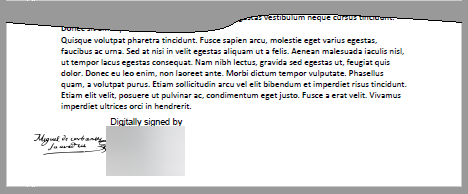
The visual representation part of the signature is located inside the VisibleSignatureConfiguration tag.
In this case, by specifying CustomText and SignerImage the space where the signature appears will be shared between the SubjectName of the certificate and the image, as shown in the following image:
Response
<s:Envelope xmlns:s="http://www.w3.org/2003/05/soap-envelope" xmlns:a="http://www.w3.org/2005/08/addressing">
   <s:Header>
      <a:Action s:mustUnderstand="1">urn:evolium:redtrust:dss:ws/RTDSSService/SignRequestResponse</a:Action>
   </s:Header>
   <s:Body xmlns:xsi="http://www.w3.org/2001/XMLSchema-instance" xmlns:xsd="http://www.w3.org/2001/XMLSchema">
      <SignResponse RequestID="PAdES_BES" Profile="DSS_PROFILE" xmlns="urn:oasis:names:tc:dss:1.0:core:schema">
         <Result>
            <ResultMajor>urn:oasis:names:tc:dss:1.0:resultmajor:Success</ResultMajor>
         </Result>
         <SignatureObject>
            <Base64Signature Type="urn:ietf:rfc:3369">...</Base64Signature>
         </SignatureObject>
      </SignResponse>
   </s:Body>
</s:Envelope>
The response shows the overall status of the request in the ResultMajor tag, a Base64Signature tag containing the PDF file with the signature encoded in Base64.
LTV PDF
This example describes how to make a call to the service to generate a PAdES signature at LTV level. The LTV level is the long-lived signature format, allowing its validation in the future, as described in the section Supported levels. PAdES only supports enveloped mode as described in section Supported modes.
Requirements
- There must be a signature profile in Redtrust defined for PAdES. The name must be PAdES, with LTV level selected (forced or not), enveloped mode, signature algorithm will depend on the certificate, typically RSA, digest algorithm SHA256 and at least one valid TSP selected as primary or secondary.
- There must be a certificate with the request identifier.
- There must be a username@domain user.
- There must be a usage policy that allows the user to use the certificate for signing documents or to use the user's personal certificate.
In this example:
SignatureFormis set to LTV.- The profile must be configured with a valid timestamp source (TSP), because LTV requires timestamps.
- The input document is a PDF provided as
Base64DatawithMimeType="application/pdf".
Request
<soap:Envelope xmlns:soap="http://www.w3.org/2003/05/soap-envelope" xmlns:urn="urn:oasis:names:tc:dss:1.0:core:schema" xmlns:xd="http://www.w3.org/2000/09/xmldsig#">
   <soap:Header xmlns:wsa="http://www.w3.org/2005/08/addressing">
      <wsse:Security xmlns:wsse="http://docs.oasis-open.org/wss/2004/01/oasis-200401-wss-wssecurity-secext-1.0.xsd" xmlns:wsu="http://docs.oasis-open.org/wss/2004/01/oasis-200401-wss-wssecurity-utility-1.0.xsd">
         <wsse:UsernameToken wsu:Id="0001">
            <wsse:Username>USERNAME</wsse:Username>
            <wsse:Password Type="http://docs.oasis-open.org/wss/2004/01/oasis-200401-wss-username-token-profile-1.0#PasswordText">PASSWORD</wsse:Password>
            <wsu:Created>2024-11-15T12:14:44.617Z</wsu:Created>
         </wsse:UsernameToken>
      </wsse:Security>
      <wsa:Action>urn:evolium:redtrust:dss:ws/RTDSSService/SignRequest</wsa:Action>
      <wsa:To>https://IP_REDTRUST:8080/RTDSSService.svc/basic</wsa:To>
   </soap:Header>
   <soap:Body>
      <SignRequest Profile="DSS_PROFILE" RequestID="PAdES-LTV" xmlns="urn:oasis:names:tc:dss:1.0:core:schema">
         <OptionalInputs>
            <q1:VisibleSignatureConfiguration xmlns:q1="urn:oasis:names:tc:dssx:1.0:profiles:VisibleSignatures:schema#">
               <q1:VisibleSignaturePolicy>GeneralPolicy</q1:VisibleSignaturePolicy>
               <q1:VisibleSignaturePosition d4p1:type="q1:PixelVisibleSignaturePositionType" xmlns:d4p1="http://www.w3.org/2001/XMLSchema-instance">
                  <q1:PageNumber>1</q1:PageNumber>
                  <q1:x>30</q1:x>
                  <q1:y>20</q1:y>
                  <q1:Width>200</q1:Width>
                  <q1:Height>75</q1:Height>
               </q1:VisibleSignaturePosition>
               <q1:VisibleSignatureItemsConfiguration>
                  <q1:VisibleSignatureItem>
                     <q1:ItemName>SignatureReason</q1:ItemName>
                     <q1:ItemValue d4p1:type="q1:ItemValueStringType" xmlns:d4p1="http://www.w3.org/2001/XMLSchema-instance">
                        <q1:ItemValue>Razón de firma</q1:ItemValue>
                     </q1:ItemValue>
                  </q1:VisibleSignatureItem>
                  <q1:VisibleSignatureItem>
                     <q1:ItemName>SignatureProductionPlace</q1:ItemName>
                     <q1:ItemValue d4p1:type="q1:ItemValueStringType" xmlns:d4p1="http://www.w3.org/2001/XMLSchema-instance">
                        <q1:ItemValue>Barcelona</q1:ItemValue>
                     </q1:ItemValue>
                  </q1:VisibleSignatureItem>
                  <q1:VisibleSignatureItem>
                     <q1:ItemName>CustomText</q1:ItemName>
                  </q1:VisibleSignatureItem>
                  <q1:VisibleSignatureItem>
                     <q1:ItemName>SignerContactInfo</q1:ItemName>
                     <q1:ItemValue d4p1:type="q1:ItemValueStringType" xmlns:d4p1="http://www.w3.org/2001/XMLSchema-instance">
                        <q1:ItemValue>Usuario Demo (user@demo.com)</q1:ItemValue>
                     </q1:ItemValue>
                  </q1:VisibleSignatureItem>
                  <q1:VisibleSignatureItem>
                     <q1:ItemName>SignerImage</q1:ItemName>
                     <q1:ItemValue d4p1:type="q1:ItemValueImageType" xmlns:d4p1="http://www.w3.org/2001/XMLSchema-instance">
                        <Base64Data>...</Base64Data>
                     </q1:ItemValue>
                  </q1:VisibleSignatureItem>
               </q1:VisibleSignatureItemsConfiguration>
            </q1:VisibleSignatureConfiguration>
            <Language>en-US</Language>
            <KeySelector>
               <KeyInfo Id="Thumbprint" xmlns="http://www.w3.org/2000/09/xmldsig#">THUMBPRINT</KeyInfo>
            </KeySelector>
            <SignatureForm xmlns="urn:evolium:redtrust:dss:1.0:core:schema">urn:oasis:names:tc:dss:1.0:profiles:PAdES:forms:LTV</SignatureForm>
         </OptionalInputs>
         <InputDocuments>
            <Document ID="ID-document-1">
               <Base64Data MimeType="application/pdf">...</Base64Data>
            </Document>
         </InputDocuments>
      </SignRequest>
   </soap:Body>
</soap:Envelope>
In the response you can see the overall status of the request in the ResultMajor tag, a Base64Signature tag that contains the PDF file with the signature encoded in Base64.
If you open the result file with Adobe Acrobat Reader DC you can check the signature in the signature panel.
Response
<s:Envelope xmlns:s="http://www.w3.org/2003/05/soap-envelope" xmlns:a="http://www.w3.org/2005/08/addressing">
   <s:Header>
      <a:Action s:mustUnderstand="1">urn:evolium:redtrust:dss:ws/RTDSSService/SignRequestResponse</a:Action>
   </s:Header>
   <s:Body xmlns:xsi="http://www.w3.org/2001/XMLSchema-instance" xmlns:xsd="http://www.w3.org/2001/XMLSchema">
      <SignResponse RequestID="PAdES-LTV" Profile="DSS_PROFILE" xmlns="urn:oasis:names:tc:dss:1.0:core:schema">
         <Result>
            <ResultMajor>urn:oasis:names:tc:dss:1.0:resultmajor:Success</ResultMajor>
         </Result>
         <SignatureObject>
            <Base64Signature Type="urn:ietf:rfc:3369">...</Base64Signature>
         </SignatureObject>
      </SignResponse>
   </s:Body>
</s:Envelope>
Next steps
-
DSS API Overview
Learn how the DSS service is structured, which operations it exposes, and how the different components of the API fit together. -
DSS API reference
Find detailed definitions of all DSS request and response elements, includingProfile,KeySelector,SignatureForm, andInputDocuments. -
DSS API
SignRequestresponse codes
Understand the possible outcomes of a signing request and how to interpret success and error responses.