About Redtrust
Redtrust is a digital identity management platform that centralizes and secures digital certificates for businesses. It provides a comprehensive solution to manage the full lifecycle of digital certificates, including issuance, usage, and storage.
With Redtrust, organizations ensure that certificates are never exposed directly to users or applications, while still allowing authorized access when needed. This reduces the risk of certificate leakage and simplifies administration across the company.
Redtrust includes the following key components that work together to achieve this.
Agent
The Redtrust agent is a lightweight desktop application that connects your device to the Redtrust platform. It lets you centrally manage digital certificates from your local machine without exposing or storing them locally. The agent acts as a secure bridge between the user's system and the platform. When a certificate is needed, such as for digital signing or authentication, the agent makes it available on demand, always enforcing the access policies defined by administrators.
The agent runs in the background and appears as an icon in the taskbar. The agent is preconfigured by your organization, so you don’t need to set it up manually. It integrates seamlessly with supported applications and browsers. (See steps to configure your browser).

Once installed and connected, the agent lets you perform a few helpful actions:
- Use a certificate: When prompted by an application, the agent shows your available certificates. You can select one to complete the operation (for example, authenticating to a site). For more detail, see How to use your digital certificate.
- Create a user PIN: If you don't have a PIN, you can configure one. See How to set up and change the user PIN.
- View your certificates: Quickly check which certificates are available to you using the Certificates section.
- Change your password: Update your credentials from the agent menu (Configuration option) without having to access your personal area in your browser.
- Access the personal area: Access the personal area in the browser to manage your certificates, change your account password or PIN, or access Signtrust.
- Check the agent's version: The About section shows the agent's version, alias and copyright information.
Personal area
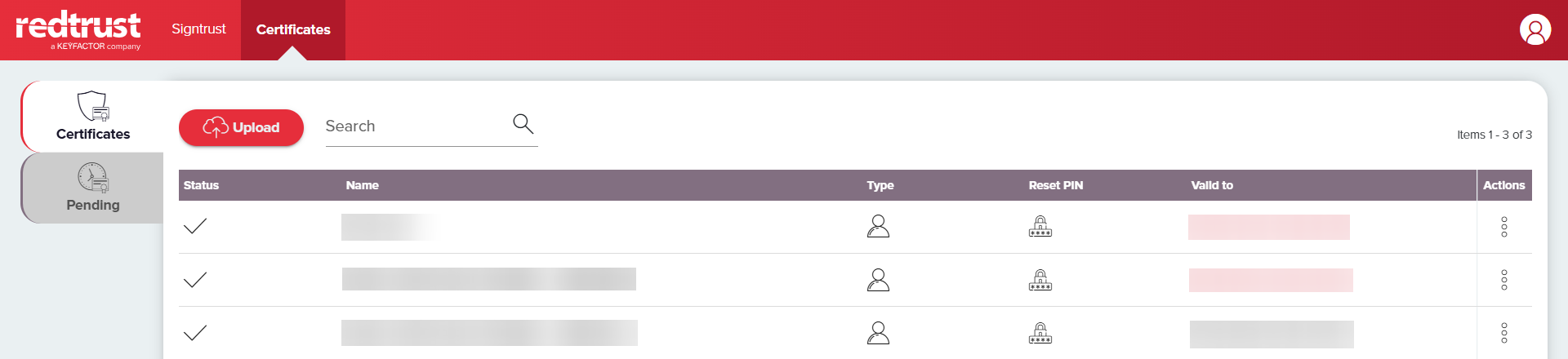
The personal area is a web-base interface where you can manage your credentials and certificates. You can access it the agent's menu or directly at https://REDTRUST_IP_ADRESS/personal/.
From the personal area, you can:
- Upload certificates using the Certificates section (if allowed by your organization).
- Change your pasword and PIN using the user icon.
- Sign files using Signtrust, Redtrust's online signing tool.
Admin console
The Redtrust admin console is a web-based interface used by system administrators to manage the platform. It lets you to control how certificates are issued, accessed, and used across your organization — all from a central location.
To access the console, open the URL of your instance in a browser (it follows this format https://REDTRUST_IP_ADDRESS/), and log in with an administrator account. Once logged in, the top navigation menu gives you access to all platform settings and activity monitoring tools.
Key actions you can perform in the admin console include:
- Monitor activity in the Dashboard, including recent certificate usage and upcoming expirations.
- Manage certificates in the Certificates section: issue, revoke, or renew corporate certificates.
- Configure alerts in the Alerts section to receive notifications about usage or expiry.
- Define access policies in the Policies section to control who can use which certificates and when.
- Set up signature rules in the Signature section to enforce signing behavior and timestamping.
- Review platform events in the Events log. Every action is tracked here.
- Manage users and roles in the Access section.
- Configure global settings in the System section, including agent behavior, integrations, and more (available only to administrators with elevated permissions).

Where to start?
This documentation is designed for a wide range of Redtrust users, including system administrators, IT architects, support teams, and integrators. Whether you're just getting started or looking to dive deeper into advanced features, this site provides resources for everyone.
- If you are new to Redtrust, begin with the Getting started section to get you started with the installation of the agent and the first steps tutorial.
- To learn about the tool's main features and use cases, check the Tutorials section.
- Experienced administrators can use the How-tos section for specific tasks and explore the Topics section to deepen their understanding on Redtrust's advanced features.